
Best Aurora Wallets: Top Picks for Developers
ℹ Introduction To Aurora Wallets
Wallets are what most people use to handle their digital assets and identity.
How To Add The Aurora Network To Your Metamask Wallet
Aurora is fully EVM-compatible, so it can be added to MetaMask like any other custom network. Here's how to do it:
- Open the Metamask browser extension.
- Click thenetwork dropdownat the top of the extension (it usually says “Ethereum Mainnet” by default).
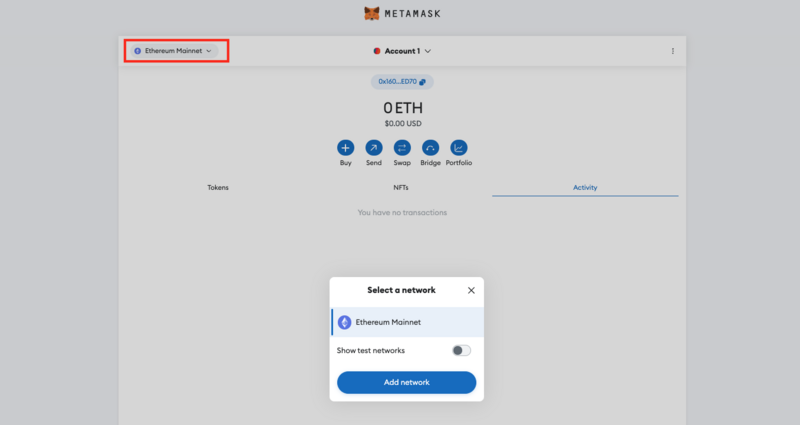
- Click the ”Add network”button.
- Click ”Add a network manually”.
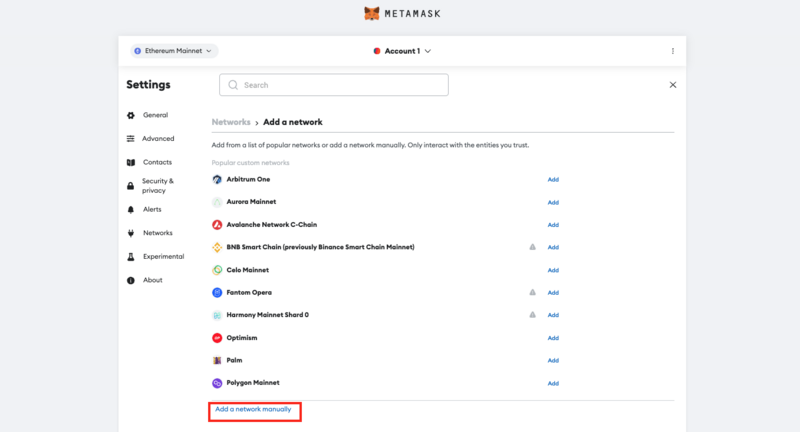
- In the form that appears, fill in the following Aurora Mainnet details:
| Network Name | Aurora Mainnet |
| Description | The public mainnet for Aurora. |
| RPC Endpoint | https://mainnet.aurora.dev/ |
| Chain ID | 1313161554 |
| Currency Symbol | ETH |
| Block Explorer | https://explorer.aurora.dev |
- Click“Save”, and Aurora will now appear in your MetaMask network dropdown.
Alternatively, you can automatically add Aurora to your wallet by using the ChainList application.
- Go toChainList.org
- Connect your MetaMask wallet.
- Type “Aurora” in the search bar.
- FindAurora Mainnetand click“Add to MetaMask.”
- Approve the prompt in MetaMask.